
How much data volume does a REX with GSM modem consume?
Assuming that a REX is connected to the myREX24 portal server 24/7, our tests have shown that up to 80 MB of data volume can be consumed per month (also depending on the ISP, 80 MB is the highest value found in our tests).
As soon as a user connects to the REX via VPN or data values are logged via the REX, the data volume will be higher.
After a device replacement USBoverIP does not work anymore
After transferring the configuration to the new device a synchronization with the portal has to be done again (In the portal click on Configuration-->Force Synchronization - see picture). After that USBoverIP works again and a connected device is recognized.
The reason:
When replacing a device the information "Firmware version" and "Hardware version" of the old device are deleted in the portal. But this information is needed for the new device to create the complete configuration (including USBoverIP). For this a new synchronization is necessary.
 After a device exchange USBoverIP does not work any moreAfter a device exchange USBoverIP does not work any more
The connection to the myREX24 portal or the REX device is slow or unstable.
shDIALUP is affected by another software/application. This could be an antivirus program installed on your Internet PC or another VPN client software already installed. As far as possible, always use current browser versions and the latest version of shDIALUP Software.
The hardware of your dial-up computer and the Internet connection should generally provide good performance. A firewall and/or proxy server in your internal network structure may also affect the connection.
Which firewall settings are necessary to reach the myREX24 server?
The shDIALUP software and the REX routers establish an outbound TCP connection to the address https://v2.myrex24.net (5.39.123.21). To establish a secure connection to the myREX24 server, at least one of the following TCP ports (80, 1194 or 443) must be enabled for the VPN tunnel. If MAC address filtering is enabled in your firewall, it must be disabled or adjusted.
In the default setting, only the openVPN port 1194 is used. If this is blocked, the REX/shDIALUP configurations must be changed accordingly. There is no automatism, which polls all three ports cyclically and switches to a free one!
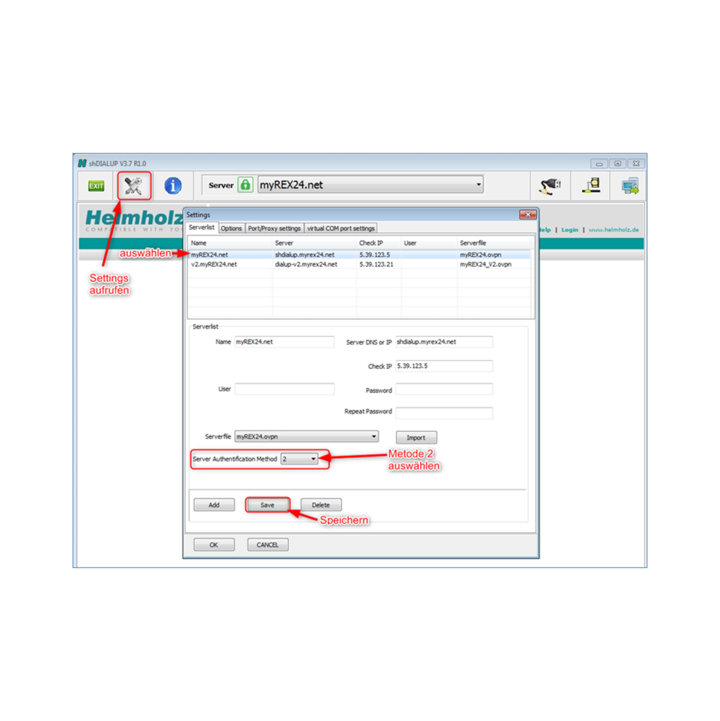
With the shDIALUP software (dial-in client) it is no longer possible to log in to the myREX24 V1 portal. The following message appears: The Authentification failed. Please make sure you have the right username and password.
For security reasons (patched in portal version 1.7.2) a login via server authentication method "1" is no longer possible. Please set the "Server Authentication Method" in shDIALUP to 2.
The Direct Line to Your Supporter.
Do you need help with your Helmholz product? The Technical Support Team offers you exactly the support you need.
Submit your support request online and we will connect you with an expert.